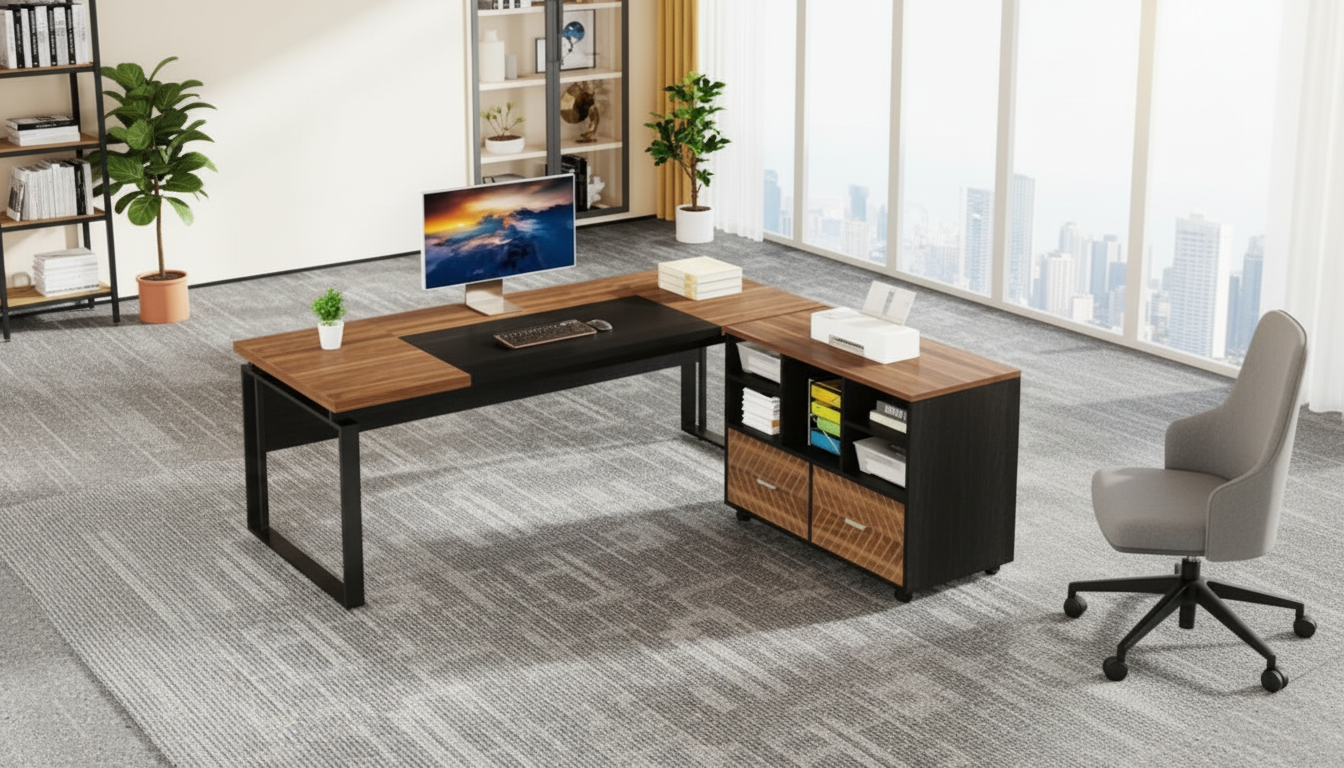
A well-designed executive desk does more than hold a laptop—it creates a reliable workflow. This modern L-shaped design pairs an expansive work surface with a reversible file cabinet and built-in storage, making it easier to separate focused work, daily essentials, and paperwork without taking over the room. The result is a clean, modern command center suited for home offices, studios, and professional spaces where layout flexibility matters.
What Makes This Desk Work for Real Workdays
An executive desk earns its keep when it supports the way work actually happens: switching between screens, notes, calls, paperwork, and quick tasks without constant clearing and rebuilding of your setup.
- L-shaped footprint supports zoning: one side for computer tasks and the other for writing, reviewing documents, or meetings.
- Executive-scale surface: keeps monitors, a keyboard, task lighting, and active projects within reach—less reshuffling, fewer “where did I put that?” moments.
- Reversible cabinet design: helps the return and storage align with room traffic flow, outlets, and preferred seating position.
- Modern styling: fits contemporary interiors while keeping the focus on the work area rather than bulky furniture.
Reversible File Cabinet: Why It Changes the Layout Options
Reversible configuration is more than a convenience—it can be the difference between a desk that “kind of fits” and one that feels custom to your room.
- Left-or-right configuration: supports different room shapes, including corners, open-plan areas, and narrow offices.
- Dominant-hand access: cabinet placement can keep frequently used files on the side that feels fastest and most natural.
- Better clearance: reversibility helps avoid drawer extension hitting a wall or blocking a walkway.
- Smarter power placement: useful when your workstation needs to land near a specific outlet or network port.
That flexibility also makes it easier to rearrange later—helpful if a guest room becomes an office, or if you rotate the room for lighting or camera angles.
Storage Strategy: Keep the Surface Clear Without Losing Access
The goal isn’t a “perfectly empty” desktop; it’s a desktop where the items you use most are easy to grab, and everything else has a home.
- File cabinet for categorized paperwork: keep active files easiest to reach, with older documents lower or farther back.
- One zone for daily tools: chargers, notebooks, headsets, and adapters stay contained so the main surface stays uncluttered.
- Simple reset routine: at the end of the day, sweep loose paper into one tray or folder, then file once a week.
- Clear corner zone for peripherals: a printer, scanner, or dock on the return side reduces device sprawl on your primary work area.
If your work involves frequent calls, consider reserving a small “ready zone” on the return side for a notepad, pen, and headset stand—so your main keyboard-and-mouse area stays centered and consistent.
Desk Sizing and Room Fit: A Quick Planning Checklist
Before assembly day, a few measurements can prevent the most common issues: tight seating, blocked drawers, and awkward cable runs.
- Measure the intended wall lengths and mark the L-shape footprint with painter’s tape.
- Confirm chair clearance so you can slide back comfortably and rotate between the two work zones.
- Plan drawer and cabinet access so they open fully without colliding with walls, baseboards, or nearby furniture.
- If using dual monitors, place them on the longer run and keep the return for note-taking, reference materials, or meetings.
- Leave room for cable routing and power strips so cords don’t cross leg space or create tripping hazards.
Room-Fit Checklist for an L-Shaped Executive Desk
| What to measure |
Recommended allowance |
Why it matters |
| Chair pull-back space |
Enough to fully stand up and step away |
Prevents cramped seating and protects posture |
| Drawer/cabinet opening path |
Full extension without hitting obstacles |
Keeps storage functional day-to-day |
| Walkway clearance |
Comfortable passage around the desk |
Reduces bottlenecks in small offices |
| Outlet and cable path |
Clear route to power/network |
Avoids visible cord runs and clutter |
Comfort and Ergonomics Setup Tips
A larger surface is only helpful if it supports comfortable positioning and minimizes strain during long sessions.
- Place the main monitor directly in front of the primary seating position; use the return side for secondary tasks.
- Keep keyboard and mouse centered to reduce shoulder reach; store rarely used items off the primary work zone.
- Use under-desk cable clips or sleeves to keep cords away from knees and rolling chair casters.
- Add a desk lamp on the non-dominant side to reduce shadows while writing or reviewing documents.
For additional workstation guidance, review the recommendations from NIOSH and the OSHA Computer Workstations eTool to help fine-tune monitor height, reach zones, and seating alignment.
Best Use Cases: Who This Setup Fits
Care, Maintenance, and Long-Term Organization
Shop Related Items
FAQ
How does a reversible file cabinet change the way the desk can be placed?
It lets you set the storage/return on either side to match the room layout, door swing, outlet location, and dominant-hand access. That improves drawer clearance and keeps your most-used storage within easy reach.
Is an L-shaped executive desk a good fit for a small home office?
Yes, as long as you measure first and plan chair, walkway, and drawer clearance. Using a corner efficiently and reserving the return side for secondary tasks helps the main work zone stay open and uncluttered.
What’s the best way to organize the storage so the desktop stays clear?
Use three simple zones: daily tools, active files, and archives. Do a quick end-of-day sweep into one tray/folder, then file weekly so paper doesn’t accumulate on the desktop.
Recommended for you





Leave a comment