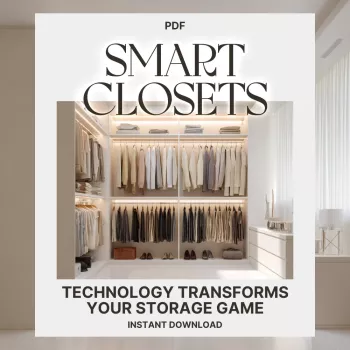
Smart closets blend thoughtful closet design with connected devices, sensors, and AI-powered apps to reduce clutter, speed up daily routines, and help clothes last longer. From lighting that turns on when the door opens to wardrobe apps that build outfits from what you already own, the goal is simple: make storage easier to use, easier to maintain, and easier to keep organized.
A smart closet is a storage space enhanced with automation, sensors, connected lighting, and digital organization tools. It’s less about flashy gadgets and more about removing tiny annoyances—dark corners, forgotten items, and the “I have nothing to wear” spiral when you actually have plenty.
Most smart features fall into four practical categories:
The strongest setups start with basic organization—zones, clear categories, and labels—then add tech only where it removes friction.
Motion-activated or door-triggered lighting is often the single best upgrade because it eliminates shadowy shelves and makes every other organizing decision easier. If you’re matching colors, look for adjustable LED color temperature: cooler light helps with accurate color matching, while warmer light gives a softer, boutique-like feel. For LED efficiency basics, ENERGY STAR has a helpful overview on lighting performance and savings: https://www.energystar.gov/products/lighting_fans/light_bulbs.
Smart plugs or in-closet power can support chargers, a small dehumidifier, a garment steamer, or a UV sanitizer (used carefully and only according to manufacturer guidance). The big win is preventing cable clutter: place a small charging station where it won’t steal shelf space, keep cords off stacks with adhesive cable clips, and use a dedicated “tech tray” so the setup stays tidy even on busy weeks.
If you already use a voice assistant, a simple “Workday” routine can turn on closet lights and share a quick weather snapshot to help you choose shoes, outerwear, or layers. Keep it optional—if it ever feels like extra steps, skip it.
Digital wardrobe tools are the “brain” of a smart closet. They’re especially helpful in shared closets, capsule wardrobes, or anyone trying to shop less while wearing more of what they already own.
If you want a structured walkthrough of smart storage ideas, wardrobe tools, and closet workflows, see Smart Closets: How Technology Transforms Your Storage Game | Digital Guide.
Inventory tracking can be as simple as “bin labels + a note on your phone,” or as advanced as RFID tagging. The right choice depends on how often your closet changes and how much accuracy you really need.
| Tool type | Best for | Typical setup | Cost level | Maintenance |
|---|---|---|---|---|
| Motion-activated lights | Visibility and faster picking | Battery or hardwired; sensor near door | Low–Medium | Replace batteries / occasional sensor alignment |
| Wardrobe inventory app | Knowing what’s owned; outfit planning | Photos + tags; optional cloud sync | Low–Medium | Add new items; occasional retagging |
| QR-labeled bins | Accessories, seasonal storage | Print QR + link to list | Low | Update lists when contents change |
| RFID tagging | Large closets, resale-heavy wardrobes | Tags + reader + database | Medium–High | Tag replacements; system upkeep |
| Humidity/air-quality sensors | Fabric protection | Sensor + alerts; optional dehumidifier | Low–Medium | Check readings; empty dehumidifier if used |
Keep security in mind with any connected device. For consumer IoT privacy and security guidance, the FTC provides an overview: https://www.ftc.gov/business-guidance/privacy-security/internet-things. For broader IoT security work, NIST is a strong reference point: https://www.nist.gov/programs-projects/nist-cybersecurity-iot-program.
Yes. Start by photographing and tagging items, then use outfit planning and inventory features; add lighting or sensors later only if they solve a specific problem.
Motion-activated lighting is usually the fastest win because it improves visibility, makes color matching easier, and reduces the time spent searching.
They can be, but safety depends on account security and privacy settings. Use strong passwords, review permissions, and avoid sharing sensitive links tied to QR labels.





Leave a comment